Junction x Aalto Defence 2026: Lost in the Mes(h)s
How three of us won the Kova Labs challenge with an encrypted mesh network for drone swarms, written in Rust on top of raw Wi-Fi frames.

Juho Torkkeli
· 10 min read
- Event
- Junction x Aalto Defence Hackathon 2026
- Dates
- May 15–17, 2026
- Challenge
- Kova Labs: tactical mesh for drone swarms
- Result
- Winner of the Kova Labs challenge
In May 2026 three of us entered the Junction x Aalto Defence Hackathon. (The event page listed the venue as “Classified”, so I’ll leave it at that.) We took Kova Labs’ challenge with LITM, short for “Lost in the Mes(h)s”: a mesh network for drone swarms, written in Rust straight on top of raw Wi-Fi frames. We won, and it was the first time I wrote Rust.
Picking the challenge
We usually pick a challenge the same way. We go through all of them and think about how many other teams will be interested, how our skills match, and what the prize is. Then we look for one where we have a good chance to win with a unique idea or the best solution. The prize should at least cover the trip, like our accommodation.
We avoid challenges with very strict guidelines on what to build. If it’s clear from the brief that every team will end up presenting the same specific dashboard, it’s hard to stand out. We’d rather have room to think outside the box.
Kova Labs’ brief left plenty of room. Each team got up to three USB Wi-Fi adapters that can inject raw IEEE 802.11 frames, plus Kova’s Rust and C libraries for driving them (kova-wfb-rs on the Rust side). The task was to build a mesh network that drones could use to talk to each other and to their operators. The brief split the problem into three layers, transmission, mesh and application, each with its own prize, plus an overall prize for the most impressive solution. Judging weighted resilience to jamming and spoofing at 34%, efficient use of the limited radio bandwidth at 33%, and applications at 33%. And in the brief’s own words: “You are free to take this in any direction.”
The real reason we picked it, though, was the hardware. In recent years we’ve looked for challenges that push us into less familiar tech, and this time we wanted to challenge ourselves with something hardware-related. Radio, mesh networks and cryptography were all new ground for me, and I had never written Rust before.
How we run the 48 hours
Our usual plan goes like this. On Friday we pick the challenge, make sure every technical blocker is solved and every open question is answered, and try to have the core concept ready by midnight. Then we go to sleep and try to sleep well, so we can pull an all-nighter the next day. Sometimes we leave LLM agents running overnight, so there’s work waiting for us on Saturday morning.
Saturday is the day we do all the work. By around midday we want something working, so we can see whether the idea is feasible or whether we need to panic and switch challenge. One of us focuses on the presentation and on how to pitch the idea. Depending on how the build goes, we get to bed at 2–4 am on Sunday and submit just before the deadline.
This time, Friday evening went to designing the layers and, mostly, to getting the hardware working. That meant getting the adapters to work, wiping my laptop and doing a fresh Linux install. It was a lot of hassle just to get the first data moving, but we needed that data to know the idea was doable.
An architecture that splits three ways
The first commit landed late on Saturday morning. Within the first hour the repo had an AGENTS.md, a design document meant as the reference for “anyone (human or agent)” working on the code. It listed the core design decisions and asked that none of them be reversed without a team discussion.
AI did the majority of the coding, and it was surprisingly good at Rust. The key was a good architecture idea: the layers were split so clearly that each of us could work on our own part.
The stack is a Cargo workspace of seven crates: common, transport, delivery, mesh, app, api and app_sdk. The common crate holds only the shared contract and no logic: a few ID types and constants, one error type, a handful of shared structs, and three traits, Transport, Delivery and Mesh. Each layer gets the layers below it as Arc<dyn …> trait objects, so every crate can be built and tested against mocks of the layers below. Three people could build three layers at the same time without waiting for each other.
How LITM works
Raw frames, no IP. The adapters run in monitor mode and inject and capture raw 802.11 frames. There’s no Wi-Fi association and no IP stack. Frames go out as unicast to a fixed sentinel MAC address instead of as broadcast, because 802.11 broadcast frames fall back to a slow 1–6 Mbps rate. Every node listens in monitor mode anyway and filters on our own 22-byte header.
Every frame is encrypted and authenticated. Payloads are sealed with ChaCha20-Poly1305. The group key ratchets forward every 60 seconds with HKDF, and old keys are wiped from memory, so capturing a node doesn’t expose older traffic. A per-sender replay window drops repeated frames, and a spoofed frame fails the authentication check. Even the packet type sits inside the ciphertext, so an eavesdropper can’t tell data from control traffic by reading the header. Beacons are the exception: to save radio budget, they go out at their natural size instead of being padded like the other frames, so an observer can still pick them out by length. The design doc lists that as hardening for later.
Fountain codes instead of resends. Delivery uses RaptorQ. The sender turns a message into a stream of encoded symbols, and any receiver that collects enough of them can rebuild the message, no matter which ones it missed. Nobody has to ask for a resend. The sender adapts how many symbols it sends to the measured packet reception rate, and stops once enough peers report in their beacons that they’ve decoded the message.
Link-state routing. Every node sends a beacon about every 100 ms with its neighbor list and link quality. From those beacons, each node builds the whole topology and runs Dijkstra locally. Flooded traffic is counter-suppressed: a node waits a short random delay before rebroadcasting a packet and cancels if it has already heard enough copies from its neighbors. That way, dense parts of the mesh quiet down on their own.
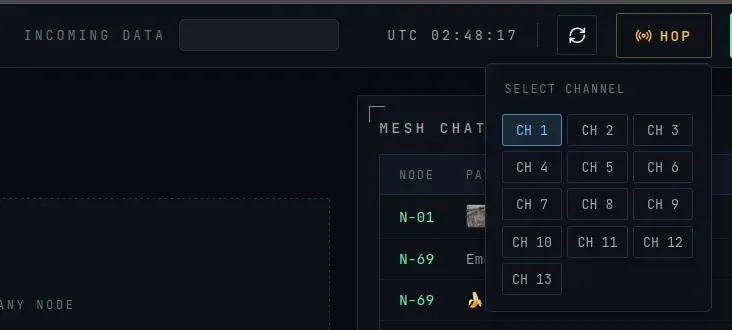
The whole mesh hops channel together. If a jammer sits on your channel, the operator requests a hop from the dashboard. The request floods through the network, and every node switches at the next 60-second epoch boundary. Epochs come from the wall clock, so no extra sync message is needed.
The biggest thing hackathons have taught me is the PoC mindset: don’t optimize a thing you might not even need in the end. This build is a good example. We didn’t write our own cryptography, FEC or radio drivers; we used existing crates. MLS would be the right long-term answer for group encryption, but it was too heavy for one weekend, so we shipped a shared group key with a forward ratchet.
My part
At hackathons I do a bit of everything, and it’s usually something mobile. This weekend I didn’t touch mobile at all.
The first mesh service. My first commit, around noon on Saturday, was the first version of the mesh service: beaconing, neighbor tracking, flooding and a channel hopper, plus an ops binary to run a node from the command line. The real radio transport didn’t exist yet, so the ops binary ran on a mock transport that simulated the radio over UDP broadcast, plus a mock delivery layer. It could start several nodes on one machine and fake a line topology (1–2–3–4–5) by having each node ignore everyone except its direct neighbors. Flooding could then be tested over multiple hops without any radio hardware. Less than half an hour later a teammate replaced my mock delivery layer with RaptorQ, in a commit titled “Implement RaportQ and replaces Juhos mock thingies”. That’s the modular design doing its job.
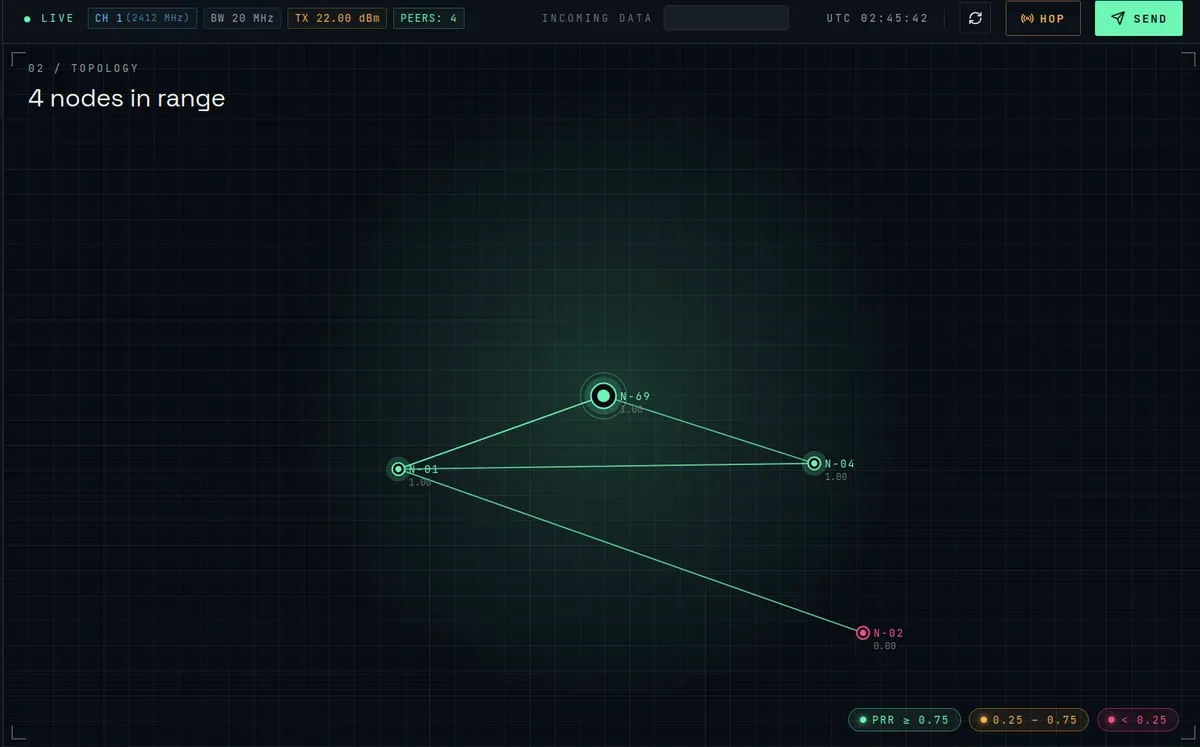
The API and the dashboard. From the mesh layer I moved up to the applications. They were a third of the score, and the demo would run in the dashboard. I started the api crate, an Axum server that bridges the Rust mesh stack to the browser, and the Svelte dashboard. Later in the afternoon, once the real Wi-Fi transport existed, I wired the API to it. By early Saturday evening I had replaced the first version of the dashboard with a new one, built from a design made in Claude Design. Over the evening and the night I built most of it: the topology graph with links colored by packet reception rate, the node grid, the packet log, messages with image attachments, and radio telemetry (channel, bandwidth and TX power) in the status bar.
Video over the mesh. The camera pipeline was my teammates’ work. I built the MJPEG streaming endpoint in the API and the dashboard view that shows live video from any node in the mesh. One bug I fixed there: the video channel dropped any subscriber whose buffer was full, so a viewer that fell behind for a moment lost the stream for good. Now a slow subscriber just skips that frame and stays connected, and only closed connections are removed.
Map markers synced over the mesh. The dashboard has a map where each operator can place markers, and they show up on every node. Markers travel as ordinary mesh messages, and each dashboard rebuilds the map from the message history. My first version toggled a marker on and off by name. I switched it to explicit place and remove messages, keyed by node and marker name, where the newest message wins and an older placement can’t bring a removed marker back.
Channel-hop status. A teammate added the hop control to the status bar. I added the status tracking and the countdown, so the operator can see a pending hop and when the whole mesh will switch. I also made each node read its current channel from the hardware at startup instead of assuming one.
I was still committing after 5 am on Sunday.
Sunday: the demo and the result
Normally we’d be in bed by 2–4 am on Sunday. This time there were only three of us, and we were still working at 8 am. Then we submitted the project and slept a few hours before the closing ceremony. It taught us to always try to get a full team of five.
Everything we submitted worked in the demo: live video streamed through the mesh, the mesh visualization and the channel hops.
We won the overall Kova Labs challenge, the prize for the best solution across all three layers.
The bigger lesson was about picking challenges. We chose this one to push ourselves, and it was the most fun we’ve had at a hackathon. We should challenge ourselves more.
The code, the protocol documentation and a PDF overview are on GitHub.