Why I wrote my own MapLibre plugin for Flutter
Why maplibre_flutter runs MapLibre Native on all six Flutter platforms, and what textures, gestures and a text bug known since 2013 taught me.

Juho Torkkeli
· 13 min read
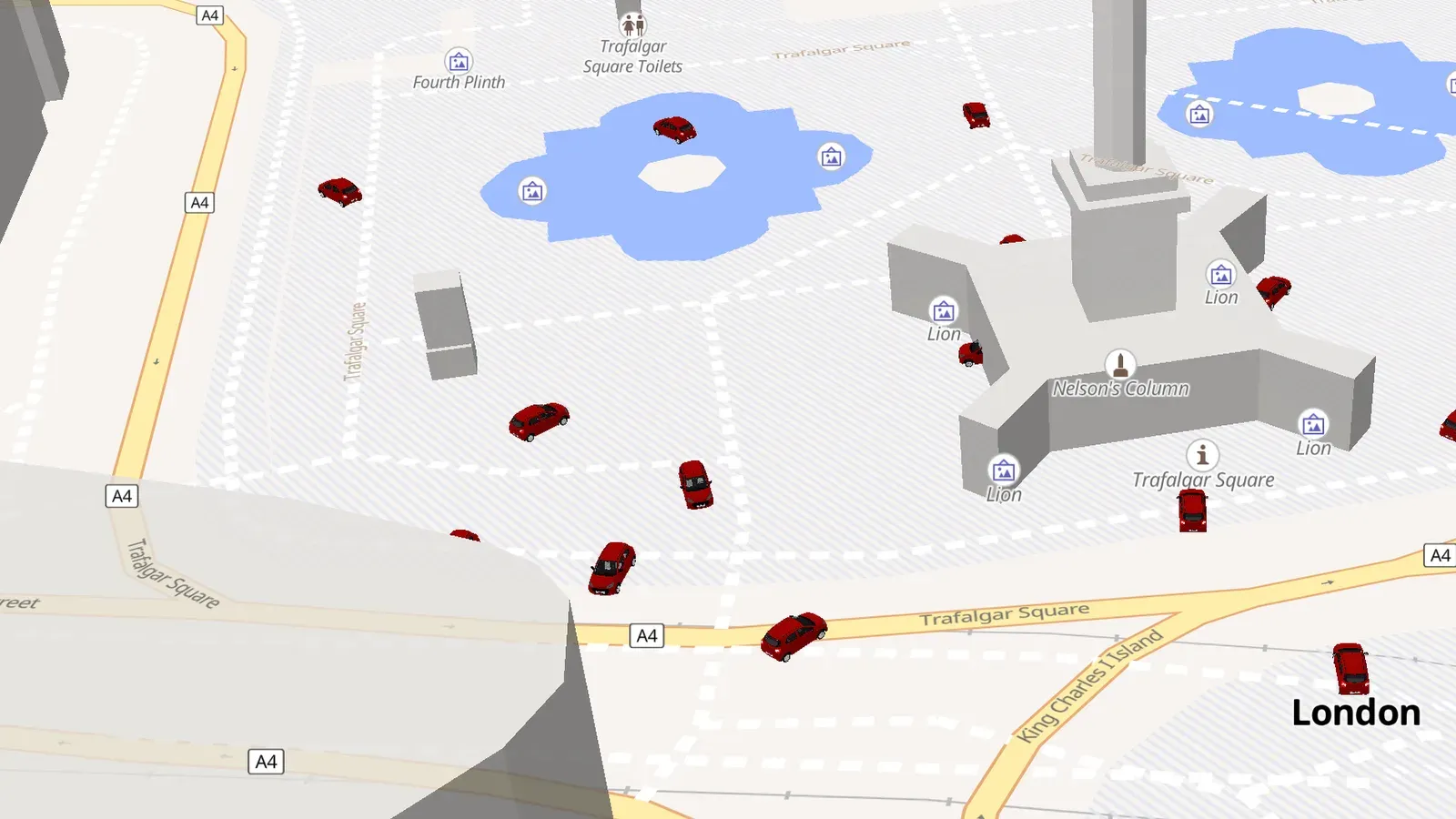
maplibre_flutter is a Flutter plugin that draws MapLibre vector maps with one engine, the MapLibre Native C++ core, on Android, iOS, macOS, Windows, Linux and the web. I started it in June 2026. This post covers why it exists, how the architecture flipped in its first week, and what turned out to be hard.
The desktop map problem
For a long time I’ve looked for a solid way to build a desktop app with a map, and there hasn’t been a good one. I didn’t want to use Qt or go native. I wanted to keep the app in Flutter.
The concrete case is the hydrant map I built for my volunteer fire brigade. It’s a Flutter app that runs on the Windows desktops in our vehicles, and it uses raster tiles. Raster maps of our area are too big to keep offline, so offline maps are switched off for now. Vector tiles would fix that, but with MapLibre, missing desktop support had been the blocker.
The options I had:
- maplibre_gl supports Android, iOS and web, but not desktop.
- maplibre reaches desktop through a WebView running MapLibre GL JS. At the end of March 2026 I spent two days on a spike with it. To get offline tiles into the WebView, the app ran its own small HTTP server that served MBTiles and PMTiles files. I stopped there because I wanted the same native engine on every platform, with no web fallback on desktop.
- flutter_map’s own license terms were a concern for me back then (I think that’s resolved now), so it wasn’t an option to build on.
- My own rendering path from the native engine into Flutter’s external textures would have been too big a project for one person.
That last point changed with LLM-assisted development. The timing of those tools, plus my need for vector maps on desktop, is what started this project. The goal from day one: the best MapLibre package for Flutter, with one unified API that’s easy to use and the same on every platform.
How I worked on it
I built it with Claude Code. The repo’s CLAUDE.md holds what’s true now, the locked architecture decisions and a list of hard-won rules. docs/decision-log.md keeps every decision and root cause in date order, so when a bug looks familiar, the fix is a grep away instead of a second investigation. Both files are public in the repo.
Day one: the conventional split
The package started as maplibre_native on June 17, 2026 and became maplibre_flutter the same day, so it wouldn’t be confused with the upstream MapLibre Native project.
The first plan was the conventional one. On mobile, wrap the native MapLibre SDKs: Android through jnigen and iOS through swiftgen. On desktop, drive the engine directly. MapLibre Native is one C++ core, mbgl-core, with a frontend per platform, and there’s none for Flutter. So the plugin brings its own: a C ABI shim over mbgl-core, Dart bindings generated with ffigen, and a Dart build hook (native_toolchain_cmake) that compiles the engine from a git submodule.
The public Dart API is identical everywhere, and all platform differences stay behind a render-agnostic platform interface. A few days in, the API settled on webview_flutter’s pattern: you create a MapLibreMapController, pass it to the MapLibreMap widget and drive the camera through it, while the style is a normal widget property.
External textures
Flutter’s external textures were new to me. The Texture widget shows a GPU texture owned by the platform side, and Flutter composites it like any other widget. The plugin runs the engine off-screen on its own render thread and hands each finished frame to Flutter.
The first milestone was a map that’s visible, the right way up and at the right scale. The engine draws into a bottom-up framebuffer and Flutter’s textures are top-down, so the Windows and Linux present paths flip the pixels on the way out.
On macOS the first version copied each frame through the CPU. The faster path is a GPU blit of the engine’s rendered texture into an IOSurface-backed texture that Flutter reads directly. A first attempt that waited synchronously on a separate Metal queue was actually slower than copying through the CPU. Running the blit asynchronously on the engine’s own command queue is what made the zero-copy path faster.
Every platform ended up with its own version of this:
| Platform | Engine backend | How frames reach Flutter |
|---|---|---|
| macOS | Metal | IOSurface, zero-copy |
| iOS | Metal | IOSurface, zero-copy |
| Windows | Vulkan | Direct3D 11 shared handle, CPU fallback |
| Linux | OpenGL ES / EGL | dmabuf, CPU fallback |
| Android | OpenGL ES | Flutter SurfaceProducer texture |
| Web | WebAssembly / WebGL2 | a <canvas> in an HtmlElementView |
Windows took the most detours. First the map was blank even though the integration test passed. The cause was curl’s asynchronous DNS resolver, which never completed inside the engine’s event loop on Windows. The fix resolves hostnames through the operating system and hands the addresses to curl. Then the map crashed during fly-to animations on the first backend, ANGLE (OpenGL ES on top of Direct3D). Switching the engine to its Vulkan backend fixed the crash.
The blank map also left a testing rule behind: a frame coming back doesn’t prove the map is visible. Tests now check real pixels.
The pivot: one engine everywhere
On June 19 the decision log still said no to running the core on mobile and the web. The native SDKs bring gesture feel, a location component and accessibility on the platforms most users run, and GL JS is the mature renderer on the web. Unifying was possible, but it didn’t look worth the risk.
Still, the desktop texture pipeline had gone well enough that trying the core on mobile was cheap. The next day, proofs of concept ran mbgl-core on iOS and Android through the same texture pipeline, and compiled it to WebAssembly with Emscripten so it drew into a canvas on the web.
Once every platform rendered through the custom pipeline straight from the core, I decided it was worth doing the custom implementation everywhere and dropping the dependency on the native SDK packages. On June 21, mbgl-core became the default renderer on all six platforms. The native SDKs and GL JS moved into separate opt-in packages, for A/B comparisons or for apps that want a native SDK’s own gesture and annotation stack.
They had to be separate packages, not a flag. A --dart-define only tree-shakes Dart code. Gradle, CocoaPods, Swift Package Manager and the build hook never see it, so both renderers’ native code would still ship. On iOS that meant two copies of mbgl in one app and duplicate symbols. With federated packages, the choice is simply which package is in your pubspec.
The payoff is that feature parity is maintained once, in the engine, instead of across three renderers.
Gestures and markers were the hard part
Once the map was on screen the right way up, the hardest thing was getting gestures to work at all, so I could move the map in some way. Gestures are implemented once in Dart on top of the engine: pan, zoom and pan inertia, alongside camera animations like fly-to. On the web the engine handles its own gestures.
The bugs weren’t always where they first seemed to be. Trackpad pinch-zoom on Windows and Linux drifted away from the cursor, and the first diagnosis blamed the Windows present path. It wasn’t that. On Windows and Linux a trackpad pinch arrives as a two-finger scale gesture whose focal point drifts as the fingers spread, while macOS reports the stable cursor position. The fix freezes the zoom anchor when the pinch starts. The lesson went into the decision log: confirm how a bug is reproduced before diagnosing it.
The other hard part was widget markers: keeping Flutter widgets in sync with the map when there’s a reasonable number of them. A marker is a real Flutter widget glued to a coordinate: tappable, draggable and animatable. The overlay is a Flow that moves its children with paint-time transforms on every camera tick, with no relayout and no rebuild.
It still lagged. Camera commands are applied on the render thread, so the newest camera state runs ahead of the frame that’s actually on screen, and markers projected against it swim. The core now keeps a ring of the last 8 transforms, tags every published frame with the one it was drawn with, and the overlay projects markers against the frame on screen. With viewport culling and a repaint boundary per marker, about 500 rich markers run smoothly in a release build on macOS.
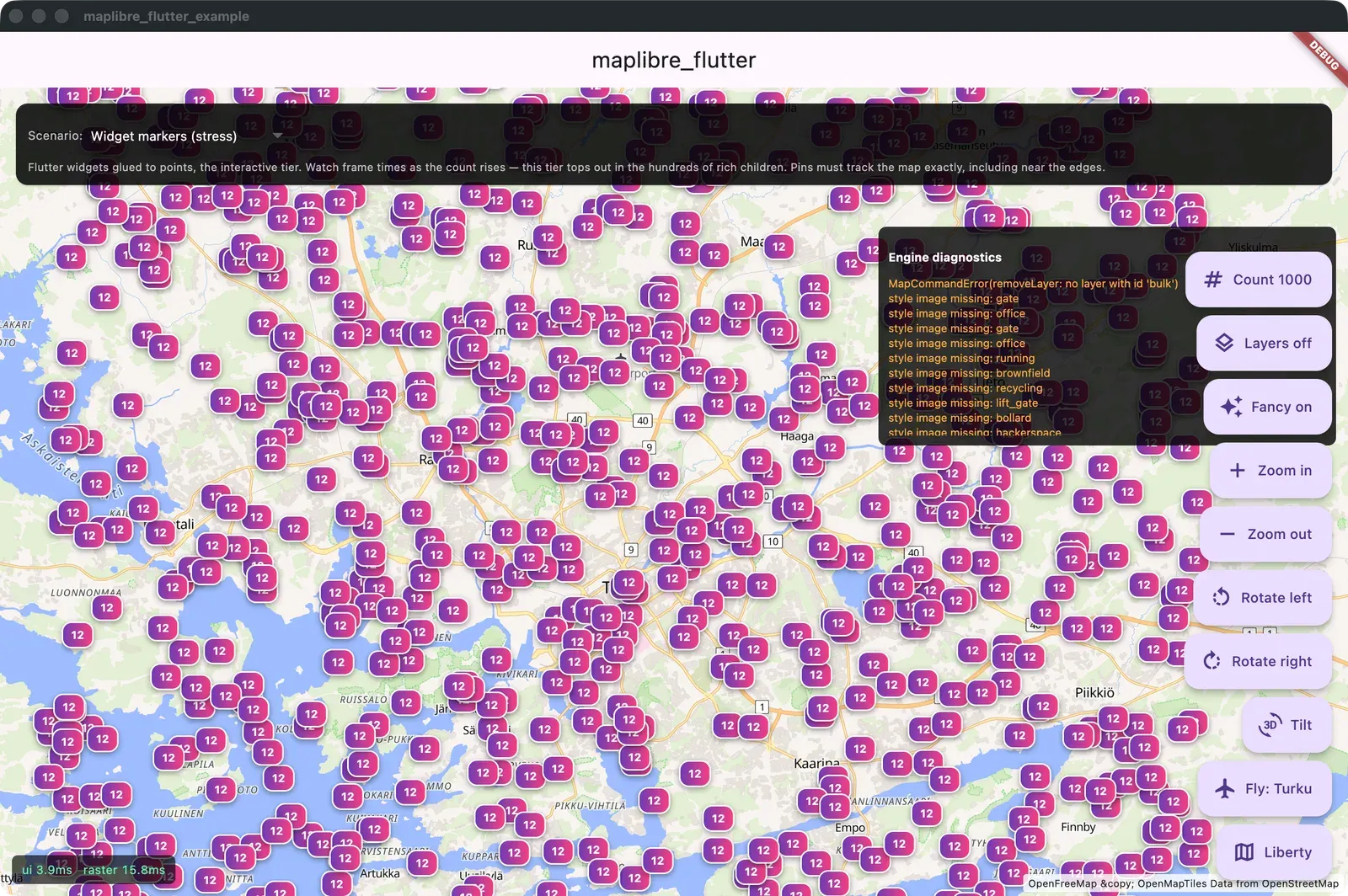
The example app’s widget-marker stress test in a debug build. Every badge is a real Flutter widget pinned to a coordinate.
For more points than that there’s a second tier: engine layers. The points go into the style and the engine draws them with the map, with clustering built in, and it scales past 100,000 points. A Flutter widget can still be rasterized into the icon for those points. It’s a picture then, not a live widget.
Projection also exposed a blind spot in the tests. The engine returns bottom-up screen coordinates, so markers tracked left and right correctly but moved the wrong way vertically, and every round-trip test still passed because a symmetric flip cancels itself out. Projections are now tested against absolute directions: north is up.
Replicating a sea chart app
My cousin was building a nautical chart app with web tech and MapLibre GL JS. Some of its labels were drawn in the wrong place, and he had no fix. To find out whether the bug was in MapLibre itself, he asked me to replicate the app on maplibre_flutter. The proof of concept runs on macOS and iOS. It renders the same Finnish sea charts as the web app (all 44 layers, from a PMTiles archive), with live AIS ship positions from Digitraffic every 30 seconds and ship name labels. There’s also a 3D chart mode where your own boat, other ships and navigation marks are drawn as geometry inside the engine.
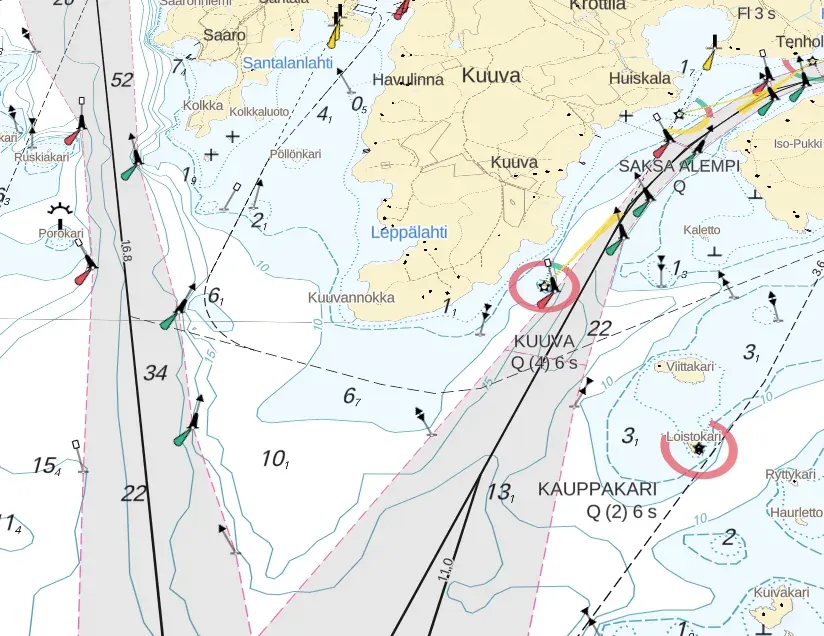
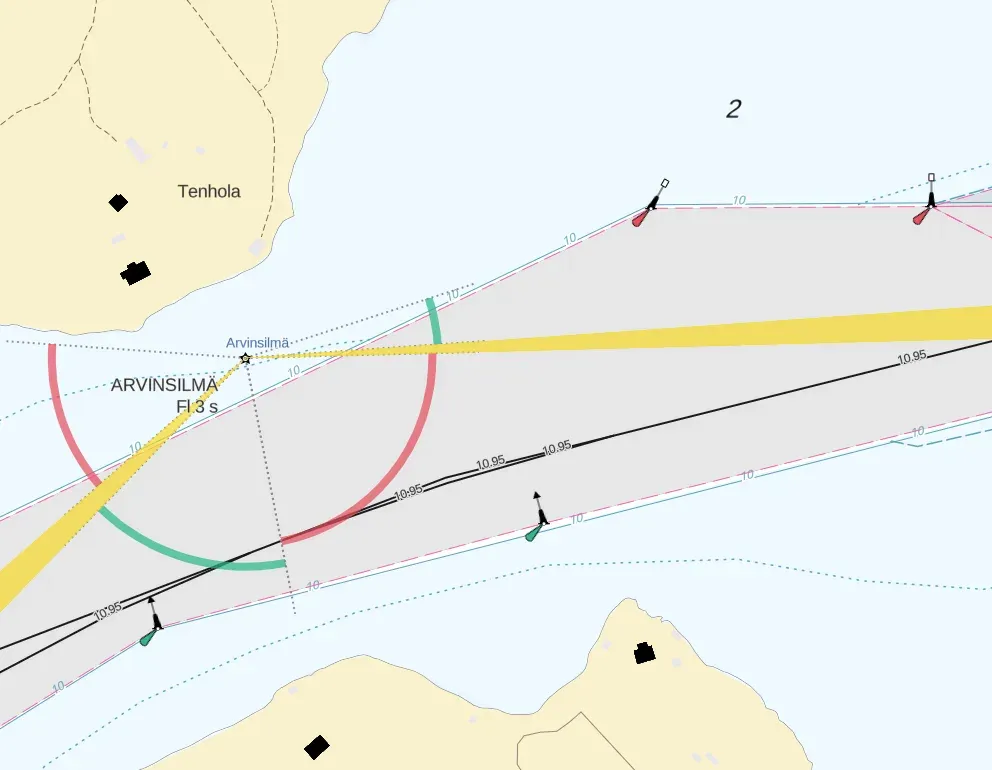
The web version of the chart, from my cousin’s app. These are the charts my native proof of concept reproduces.
The label that sat too high
The charts draw swept-depth numbers along fairway lines, centered on the line. In my cousin’s app the numbers sat above the line instead. My replica had the same bug, so it wasn’t in his app or in my plugin. It was in both MapLibre engines.
The engine is a git submodule in the repo, so I had the MapLibre sources on my machine. I directed the agent to look there, find the cause and implement a fix.
The icons pointed the way. With identical layer options at six line angles, plain icons and sprite icons land dead center, and only the text is displaced. So placement is exact, and the fault is in text shaping.
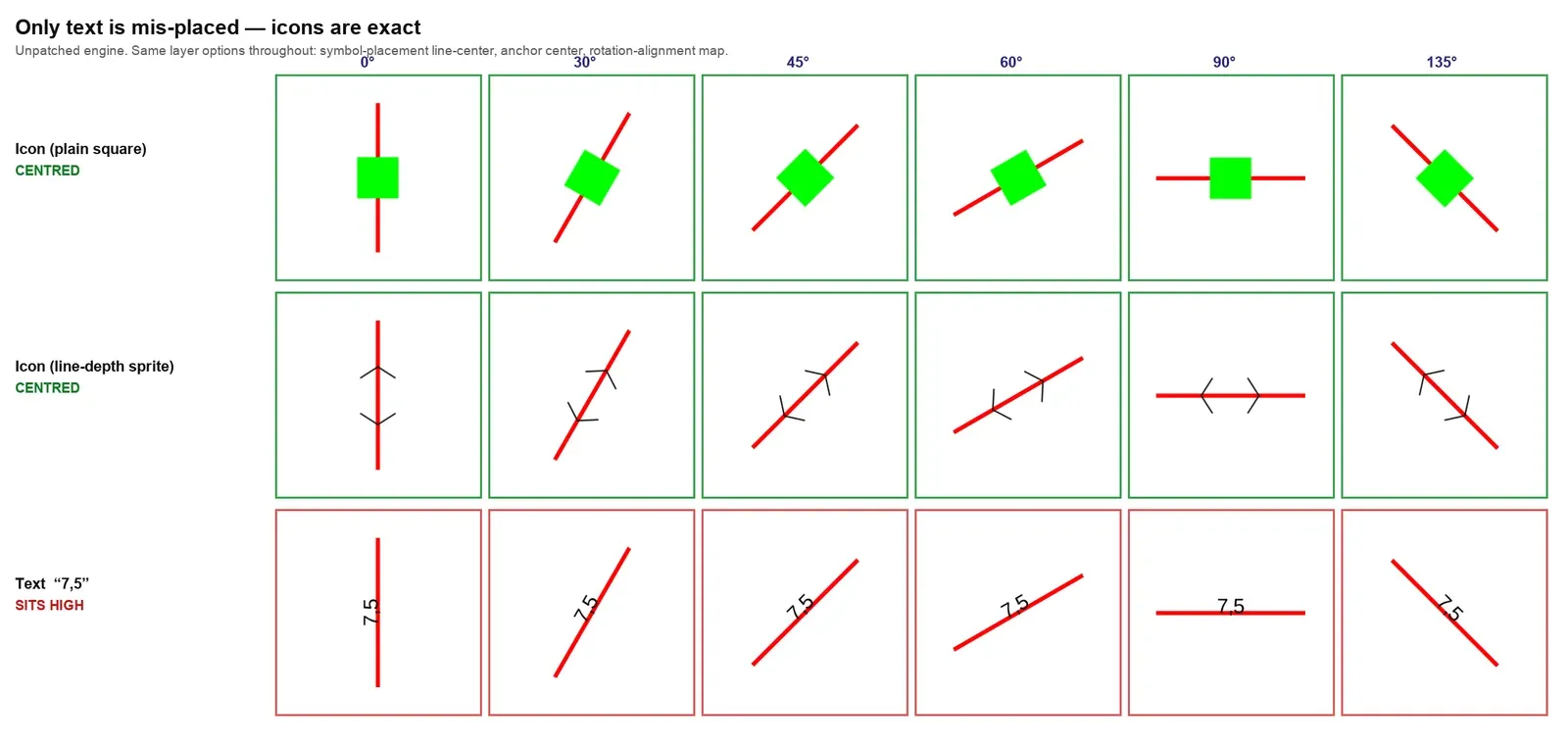
The cause is a hardcoded baseline. Both MapLibre Native and MapLibre GL JS position text vertically from a constant, -17 in a 24-unit em, calibrated against one font years ago, instead of using the font’s real metrics. The engine source even says so in a comment: “The y offset should be part of the font metadata.” Any font whose metrics differ renders center-anchored text off-center.
The style can’t fix it. text-offset is applied in the glyph’s own frame, which flips with the direction the line was drawn in, so a value that centers one direction pushes the other twice as far out. text-translate has no effect on line-placed labels at all.
The patch centers the text on the actual ink extent of the shaped glyphs. It’s one function in shaping.cpp, applied by the plugin’s build hook, and it only touches center anchors. A native probe test fails without the patch and passes with it. Measured across 24 orientations in 15-degree steps, labels went from 4.03 px off center to 0.25 px.
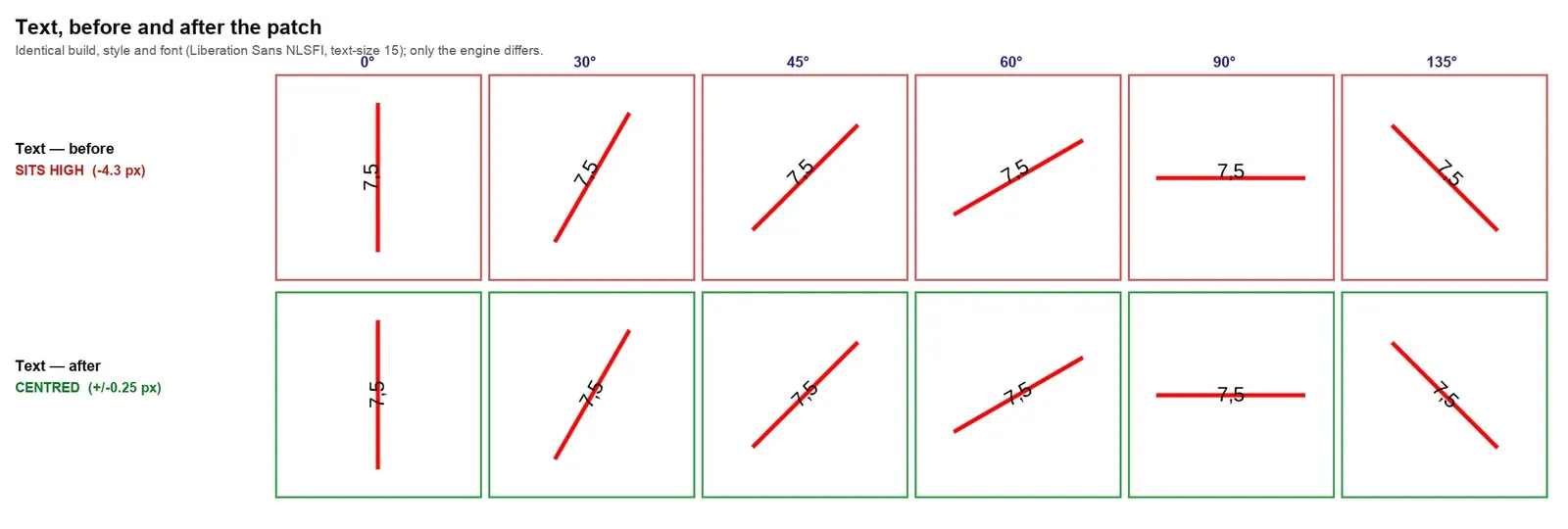
This isn’t a new discovery. It’s a long-known limitation, reported against Mapbox GL JS back in 2013 in #154 and #191. The first of those even suggests deducing the offset from the shaped text’s bounding box, which is close to what the patch does. There’s no MapLibre issue for it yet.
I haven’t taken it upstream yet. I want it to be a high-value contribution, not AI slop. I understand the patch as it is, but first I want to test it with more fonts and cases. A matching patch for GL JS is written but untested, and I want to validate that too. The measurements and the full root cause are in the text-centering write-up in the repo.
Where it stands
It’s pre-release. The git tags 0.0.2 and 0.0.3 exist, but nothing is on pub.dev yet. The engine is a multi-gigabyte submodule that’s left out of the published archive, so today you have to build from source. The missing piece is GitHub CI that builds the native cores, so anyone can depend on the package without compiling the engine. Once that’s in place, I’ll publish it to pub.dev.
It’s my personal project. It’s published under Mankeli Solutions because publishing is easier that way, and it’s BSD-3-Clause licensed.
macOS is the reference platform: every feature lands and gets verified there first. I’ve run the map on real devices on every Flutter platform, a physical Android phone included. The extended API (widget markers, engine layers, feature queries and the typed style API) is written once for all five native platforms, and the repo’s feature matrix marks what has actually been run where.
A lot of work is in progress on branches that aren’t merged yet:
- Accessibility: the map as a labeled screen-reader region, accessible markers, keyboard control with a visible focus ring, reduced motion, high contrast, and a feature list as an accessible alternative to the map.
- API parity with the native SDKs, driven by a 703-row binding spec: camera verbs like
easeToandfitBounds, feature state, offline region downloads, custom HTTP headers, a snapshotter and a location puck. - Cross-platform parity: 3D models and rotate and tilt gestures on every native platform, and one conformance test suite across all five native platforms.
The hydrant map will move onto it, and with vector tiles, offline maps can come back.