Message Alert Pro
An iOS app that turns fire alert text messages into Critical Alerts that sound through silent mode and Focus, with the address and route on a map.

Juho Torkkeli
· Updated
Updated : V1 on TestFlight, v2 in progress ↓
Overview and background
Many fire departments send alerts either as a text message or as an automated phone call. I prefer the text message: on a call I hear the address once, but a text stays on screen and I can check the details again.
The catch is making sure I notice every alert text. My workaround was Emergency Bypass plus a distinct tone for the alert sender’s contact. On iOS this setup has two flaws. To silence the tone for a while, I had to open the contact’s settings and turn Emergency Bypass off by hand. That step was easy to forget, and I usually only fixed it after the next alert. And if you wear an Apple Watch, it plays the default notification sound instead of the custom tone.
Message Alert is an unofficial backup, not a replacement for the official alerting system.
Development process
For a long time I wished iOS Focus modes could decide whether alert texts make a sound. I also looked at Apple’s Critical Alerts, which play a sound even when the phone is on silent or in a Focus. But how could I trigger one when a text arrives?
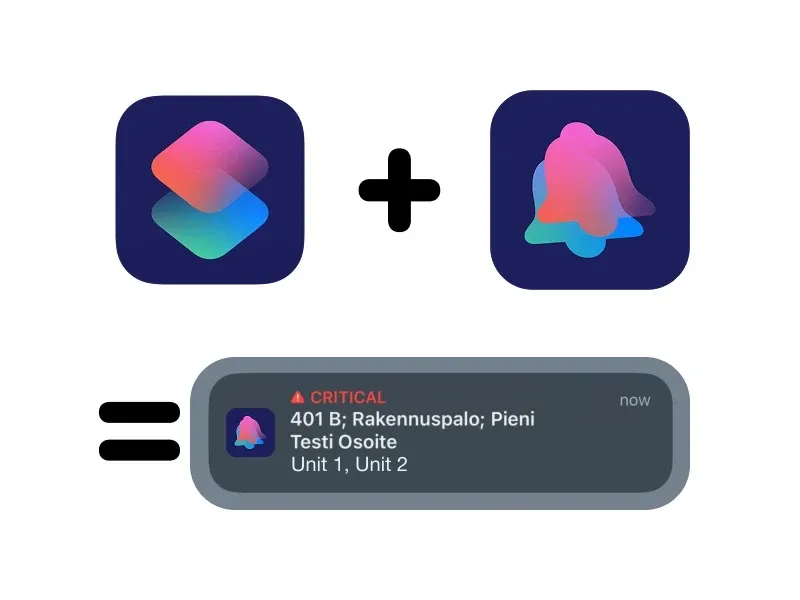
Then I found that the Shortcuts app can run an automation when a message arrives from a specific contact, optionally only when it contains a keyword. That solved both problems: the automation is the trigger, and it can be set to run only in certain Focus modes or to skip specific ones.
The next step was sending the critical notification itself. My first version had my Home Assistant server send it. It worked, but only as long as my home network connection stayed up.
I wanted something more reliable that also works offline, so I built a native iOS app. iOS was the easier platform for this: Shortcuts intercepts the incoming message for me, so the app doesn’t have to. The app adds its own action to Shortcuts (an App Intent), and when the automation runs that action, the app posts a local notification.
The first app version, from November 2024, already read the message. It detected the alert type from its code (for example, 401 means a small building fire) and picked out which of our units were dispatched. Tapping the notification opened a map with the address, the driving time and a button that starts navigation.
It still posted normal notifications, though. Critical Alerts need a separate entitlement from Apple. I applied for it, and to my surprise Apple approved it within the same week. In February 2025 the app started sending Critical Alerts, and with that it did its main job.
Outcome
This section describes the state in February 2025. See the update below.
- A standalone native iOS app that posts local Critical Alerts, triggered by an iOS Shortcuts automation.
- Reads the alert type and the dispatched units from the message, so the key details are readable at a glance.
- A map view with the address, estimated driving time and one-tap navigation.
- No external servers: the phone creates the notification itself, so it doesn’t depend on my home network. The map and driving time still need a connection.
Next steps
The old list here (customizable message schemas, choosing what the notification shows, an App Store release and a business model) became the plan for v2. See the update below.
Technologies and tools
- Swift
- SwiftUI
- App Intents and iOS Shortcuts
- UserNotifications (Critical Alerts)
- SwiftData
- MapKit (map, driving time and navigation)
- WidgetKit (Control Center and Lock Screen filter control, v2)
- Swift Testing (v2 engine tests)
- OpenStreetMap building data
- Home Assistant (the first proof of concept)
- Claude (the app is a side project I’ve built with it)
Update (Sep 30, 2026): v1 on TestFlight, v2 in progress
Message Alert is on TestFlight, where four other people use it besides me.
In January 2026 I rebuilt v1 in a fresh repository. The prototype’s history had things I didn’t want to publish, like real addresses, and I wanted to be 100% sure nothing could leak if the code ever goes public. v1 stores alerts on the device with SwiftData, can re-parse old alerts when the parser improves, and has a Finnish UI.
It has worked when it mattered, especially after I added a custom address parser for one area where Apple Maps and Google Maps can’t navigate to the right place. It uses building data from OpenStreetMap, and on a real alert it took us to the right spot without anyone looking through paper maps.
v2
v1 only understands our alert message format. v2, which I’m building now, is a general app that works with any alert message, and users build the schema for their own messages. It’s made of three blocks:
- Schema reads a message into named fields, using Shortcuts-style steps or a wizard.
- Notification decides how loud an alert is, with If / Else if / Else rules.
- Filter is a global override while it’s on, like “on call”, switched from Control Center, the Lock Screen or a Shortcuts action.
Schemas can be shared as files. v2 is still in progress, and it hasn’t been through its checks on real devices yet.
v2 also gives the name its meaning: Pro will be the paid tier for power users. An Android version is planned too, now that I have experience with messaging on the Android side.
The whole story, from the Home Assistant prototype to the v2 model, is in Building Message Alert.